ZugerKB Multibanking – All your bank accounts in one place
Link your other bank accounts to the ZugerKB Banking app and see everything at a glance.


Link your other bank accounts to the ZugerKB Banking app and see everything at a glance.
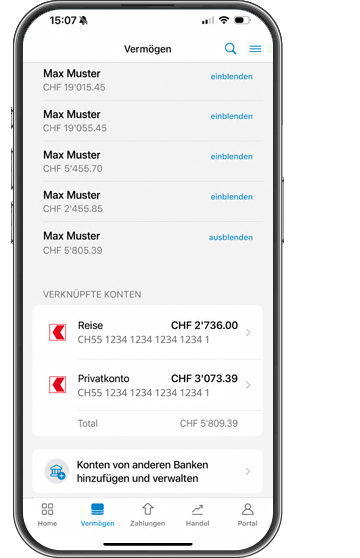
With our step-by-step instructions, linking your other bank accounts to your ZugerKB Banking app is simple and convenient.
With Multibanking you can display your other bank accounts in the ZugerKB Banking app – enabling you to see your accounts with ZugerKB as well as other banks clearly and in one place.
Multibanking enables you to keep an eye on your accounts with different banks. You can view your accounts centrally within the ZugerKB Banking app, thus avoiding the need to switch between different banking apps.
Multibanking is particularly suitable for those who hold accounts with multiple banks and wish to be able to view them in a single place. The ZugerKB Banking app enables you to see all your accounts at a glance.
Yes, you can remove a linked bank account from Multibanking at any time. Deciding which bank accounts to use is up to you. Please note that as a general rule you will need to contact the bank concerned in order to cancel data sharing.
Multibanking is free of charge with Zuger Kantonalbank. However, some other banks will charge a fee if you link their accounts to the ZugerKB Banking app.
No. Multibanking currently only lets you view account information from other banks in the ZugerKB Banking app. Payments and securities transactions through linked accounts with other banks are not possible.
The ZugerKB Banking app tells you which banks are currently supported and also enables you to search for a specific bank. The range of banks whose accounts you can include is growing continuously.
Yes, If the other bank’s banking app supports Multibanking, you can add your ZugerKB accounts to it.
When you link an account with another bank to Multibanking you’ll need to use that bank’s protected login procedure, consisting of a user name, password and third security factor. ZugerKB does not store your access data for other banks. Data is shared via bLink, SIX’s standardised platform for secure data exchange between financial institutions and third-party providers. Deciding which bank accounts to add is up to you; you can remove them again at any time. Only account queries are possible at present; you cannot carry out transactions through linked accounts with other banks.
Multibanking essentially involves similar risks to the ZugerKB Banking app. These include phishing, in other words fraudulent attempts to obtain your access details, as well as improper use of personal access data. Never disclose your access details or verification codes. Check any requests and authorisations carefully, and always use trustworthy devices and access systems.
ZugerKB only sees the transaction data for the accounts you have linked to Multibanking, and only for the last six months. ZugerKB cannot view your custody accounts, securities transactions or other products with the linked banks.
1. Use
You can link other bank accounts to Multibanking if you have the required authorisation or a relevant power of attorney.
2. Data protection
ZugerKB receives data for the accounts which you link to Multibanking. According to the conditions of use, ZugerKB is allowed to use these data for regulatory and marketing purposes for example.
3. Liability
ZugerKB cannot fully guarantee that the data transmitted by other banks is correct, complete and available.
4. Cancellation
You can deactivate Multibanking at any time. As a general rule, you will need to contact the individual bank concerned in order to cancel data sharing.
Our Support team will be pleased to assist and is available from Monday to Friday between 8 a.m. and 6 p.m.